 in the toolbar to open the
Alarm Designer in a new window.
in the toolbar to open the
Alarm Designer in a new window.Click the
Alarm Designer button
in the toolbar to open the
Alarm Designer in a new window.
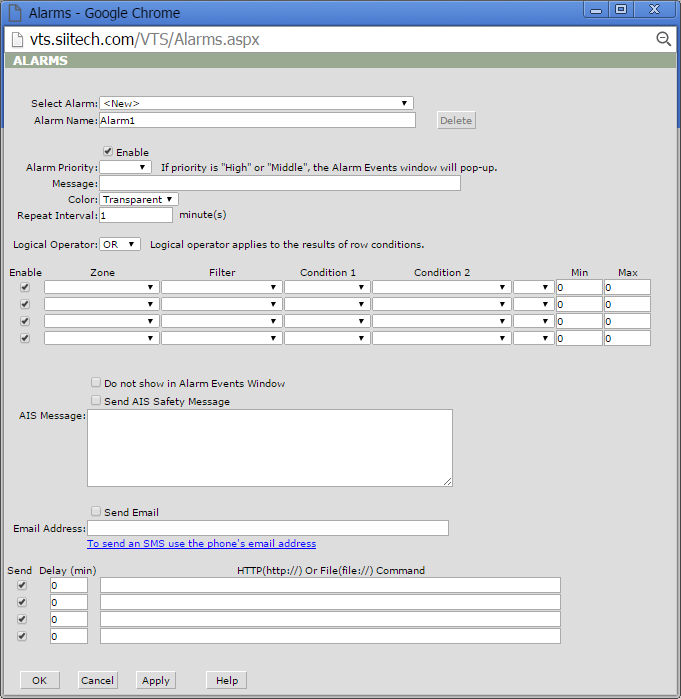
Select Alarm. Select an existing alarm or create a new alarm.
Alarm Name. Display and edit an alarm name (by default the program uses "AlarmN" for every new alarm created, where N is the first available number).
Delete. Delete any selected alarm.
Enable. Check the box to enable the alarm.
Alarm Priority. Select level of alarm priority from "Low", "Middle", or "High". Selecting "Middle" or "High" priority will cause the Alarm Events window to automatically pop-up when the respective alarm is triggered. Note: Make sure that you browser allows pop-ups from the Web VTS website.
Message. Type the message you would like to appear on screen when the alarm is triggered.
Color. Select a text color from the drop-down menu for the message in the Alarm Events window.
Repeat Interval. Set a minimum time interval between notifications for alarms triggered more than one time. Enter "0" if you do not want to receive repeat notifications.
Logical Operator. Select "OR" to trigger an alarm event if conditions in any single row are met. Select "AND" to trigger an alarm if conditions in all rows are met.
Enable. Check this box to enable a zone.
Zone. Select the zone in which you wish to monitor alarm conditions.
Filter. Select the filter to monitor alarm conditions for specified ships only.
Condition 1. Select the alarm condition without parameters (see description below).
Condition 2. Select the alarm condition with parameters (see description below).
Do not show in Alarm Events Window. Prevents alarm notifications from appearing in the Alarm Events window.
Send AIS Safety Message. Check this box to send AIS Safety Messages to ships which triggered this alarm. Note: Web VTS must have access to AIS transponder or AIS base station.
AIS Message. Enter the body of text to be sent in AIS Safety Message.
Send Email. Check this box to receive alarm notifications via e-mail.
Email Address. Enter e-mail address or addresses separated by semicolons (;).
HTTP(http://) Or File(file://) Command. Use these fields for sending HTTP commands or updating text files on the server.
On Enter. Triggers alarm when ship enters zone.
On Exit. Triggers alarm when ship exits zone.
On Enter/Exit. Triggers alarm when ship enters or exits zone.
Light Off. Triggers alarm when AtoN light is off.
Light Error. Triggers alarm if AtoN reports light error.
RACON Error. Triggers alarm if AtoN reports RACON error.
Health Alarm. Triggers alarm if AtoN reports health alarm.
Off Position. Triggers alarm if AtoN reports off-position status.
Low Battery. Triggers alarm if AtoN reports low battery status.
Photocell Error. Triggers alarm if AtoN reports photocell error.
DSC Distress Alert. Triggers alarm if a DSC distress alert has been received.
DSC Urgency Call. Triggers alarm if DSC urgency call has been received.
DSC Safety Call. Triggers alarm if DSC safety call has been received.
DSC Routine Call. Triggers alarm if DSC routine call has been received.
In Zone. Triggers alarm if ship is located in specified zone.
Not In Zone. Triggers alarm if ship is located outside the specified zone.
New Ship Data. Triggers alarm if AIS data of ship has changed (ship name, call sign, IMO).
Mile Marker. For internal use.
Geo-Fence. Triggers alarm if AIS transponder generates "Geo-Fence Alert" signal.
SOS. Triggers alarm if AIS transponder generates "SOS Alert" signal.
Power. Triggers alarm if AIS transponder generates "Low Power Alert" signal.
On Battery. Triggers alarm if device is battery powered.
Open Doors 0. Triggers alarm if device generates Door Open signal (0).
Open Doors 1. Triggers alarm if device generates Door Open signal (1).
Bit0 - Tilt. Triggers alarm if AtoN tilt sensor is activated.
Bit1 - Shock. Triggers alarm if AtoN shock sensor is activated.
Bit2 - GPS. Triggers alarm in case of AtoN GPS acquisition failure.
Bit3 - GSM. Triggers alarm in case of AtoN GSM module failure.
Bit4 - AIS. Triggers alarm in case of AtoN AIS module failure.
Bit5- Guard. Triggers alarm if AtoN guard sensor is activated.
Bit6 - CTRL. Triggers alarm in case of AtoN controller hardware problem.
Bit7 - Power. Triggers alarm in case of AtoN power subsystem failure.
GPS. Triggers alarm if AIS transponder generates "GPS Alert" signal.
Speed (knots). Triggers alarm if ship speed is in specified range.
Wind Speed (knots). Triggers alarm if wind speed is in specified range.
Wind Gust (knots). Triggers alarm if wind gust is in specified range.
Air Pres. (hPa). Triggers alarm if air pressure is in specified range.
Air Temp. (°C). Triggers alarm if air temperature is in specified range.
Analogue Int. (V). Triggers alarm if AtoN analogue internal voltage is in specified range.
Analogue Ext.1 (V). Triggers alarm if AtoN analogue external voltage is in specified range.
Analogue Ext.2 (V). Triggers alarm if AtoN analogue external voltage is in specified range.
Voltage (V). Triggers alarm if AtoN voltage is in specified range.
Current (A). Triggers alarm if AtoN current is in specified range.
Reporting Interval (min). Triggers alarm if ship reporting interval is in specified range.
Time to Enter (min). Triggers alarm if ship will enter zone within specified time interval.
Time to Exit (min). Triggers alarm if ship will exit zone within specified time interval.
Course Change (min|deg). Triggers alarm if ship is changing course within specified parameter.
Approach (meters|min). Triggers alarm if ship is approaching another ship with the specified speed.
Min.Speed and Time (knots|min). Triggers alarm if ship speed is less than specified for a given time span..
Max.Speed and Time (knots|min). Triggers alarm if ship speed is more than specified for a given time span.
Note: to trigger an alarm when parameters are out of specified range, use the "NOT" prefix.