 in
the toolbar to open the Route Designer
window.
in
the toolbar to open the Route Designer
window.The Route Designer is a designed to provide the user with a tool for obtaining an ETA (estimated time of arrival) to the desired waypoint by allowing the user to build a route.
Click the Route Designer button in
the toolbar to open the Route Designer
window.
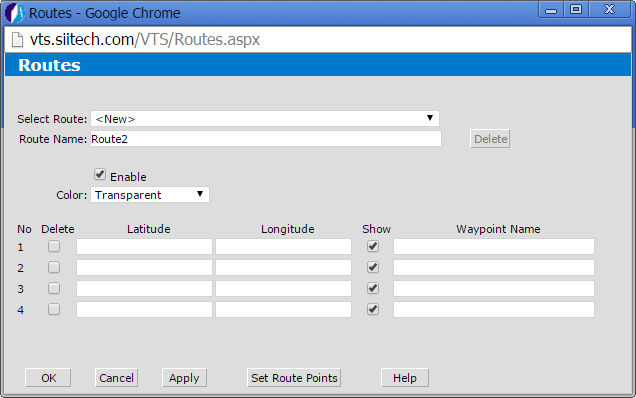
Select Route. Select an existing route or create a new route.
Route Name. Display and edit a route name (by default the program uses "RouteX" for every new route created, where X is the first available number).
Delete. Delete any selected route.
Enable. Check the box to enable the route.
Color. Select the desired color of the route line from the drop-down menu.
Latitude and Longitude. Enter the route's coordinates. Tip: click Set Route Points to select the coordinates on a map. Click Return to Designer to go back to the Route Designer.
Delete. Check this box to select the latitude and longitude pair(s) you wish to remove. Click Apply to delete.
Waypoint. Type the Waypoint's name to display it on the chart.
Show. Uncheck this box to eliminate a waypoint from the chart/map and ETA calculation.
OK. Save changes and return to the main view.
Cancel. Cancel all changes and return to the main view.
Apply. Save changes and keep the Route Designer window open.
Help. Open the Web VTS User's Guide.