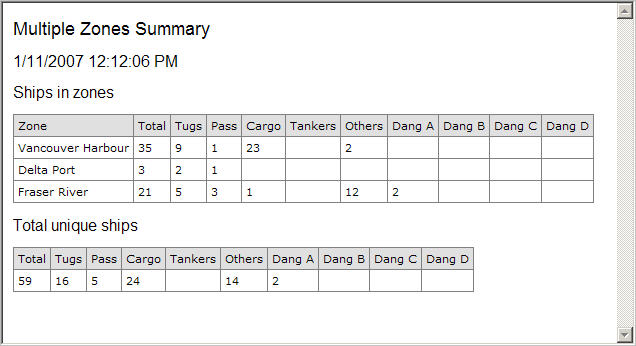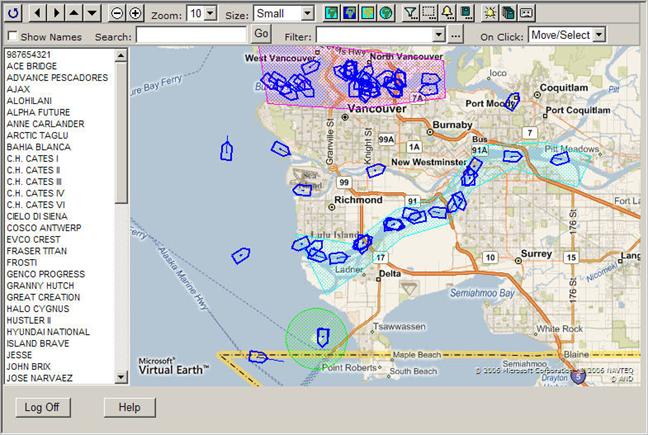
Three zones have been created: Vancouver Harbour (the magenta polygon), Delta Port (the lime circle) and Fraser River (the cyan polygon). Please see below.
Creating the Zone Summary report for the multiple zones:
Click  to open the Report Designer panel.
Click the Select Report dropdown box and select <New>.
Instead of “NewReport1” type “Multiple Zones Summary” in the Report field.
Leave Enable checked.
Select “Zone Summary” from Report Type.
Select “Vancouver Harbour” from the Zone’s first line.
Select “Delta Port” from the Zone’s second line.
Select “Fraser River” from the Zone’s third line.
Leave Filter blank.
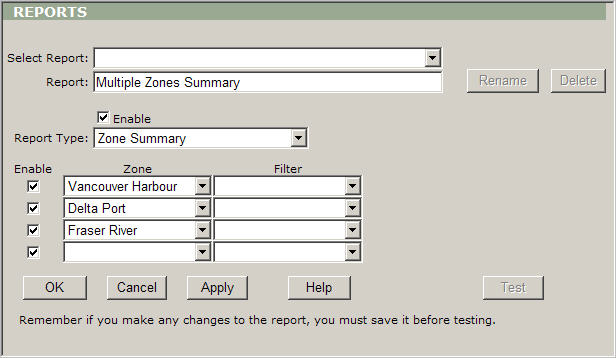
Click Apply to save the settings.
Click Test to display the report.