You can navigate (move your view) in two dimensions in any SiiTech Charts/Maps.
To pan (move the map), click and drag the map.
Additionally, you can zoom in or out pressing the + or - keys.
To center and zoom in on a location, double click the location.
To center and zoom out on a location, hold Ctrl and double click the location.
Using the Navigation Controls
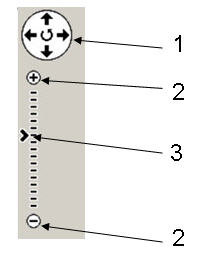
The navigation controls you see at Web VTS are shown above. Navigation controls include:
1. Arrows - Click the appropriate arrow buttons to move the view north, south, east or west.
2. Zoom - Click + to zoom in on the center of the map. Click - to zoom out.
3. Slider indicator - Gives knowledge about zoom level.