 on the toolbar and the Run Report window appears.
You can run and display any previously built report using the Run Report window.
To show the Run Report window click the Reports button on the toolbar and the Run Report window appears.
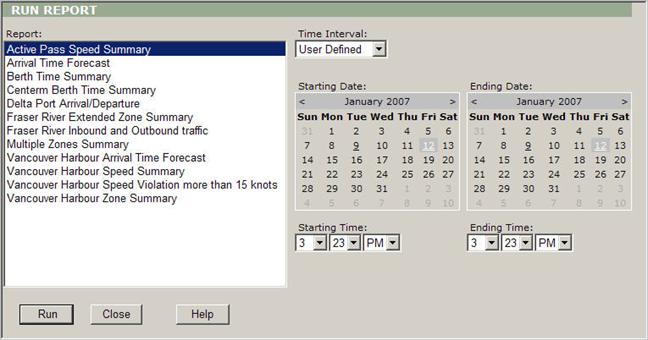
Run Report description:
Report: Select the desired report from this window.
Time Interval: Select the desired time interval from this dropdown box. (User Defined, Last 24 Hours, Last 48 Hours, Last 10 Days, Last 30 Days, Last 90 Days, Last 365 Days, Today, Yesterday, This Week, Last Week, This Month, Last Month, This Quarter, Last Quarter, This Year, Last Year, All).
Starting Date: Use this calendar to select the starting date, when you choose the User Defined mode of the Time Interval box.
Ending Date: Use this calendar to select the ending date, when you choose the User Defined mode of the Time Interval box.
Starting Time: Select the hour, the minute and AM or PM from these dropdown boxes.
Ending Time: Select the hour, the minute and AM or PM from these dropdown boxes.
Run: Click this button to run and display the report.
Close: Click this button to close the Report window and move back to the viewer.
Help: Click this button to open the manual.