 and the AID TO NAVIGATION panel appears.
Note: This function works only with the connected AIS base station.
To start to work with Virtual AIS AtoN’s function, click the Virtual AtoN button and the AID TO NAVIGATION panel appears.
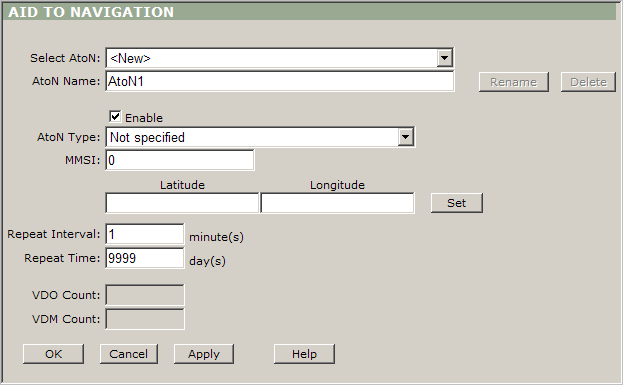
Virtual AIS AtoN panel description:
Select AtoN: Use this dropdown box to select any existing AtoN or create a new one.
AtoN Name: Use this box to display and edit AtoN’s name (by default the program uses ”r;AtoNX” name for every new AtoN, where X is a first available number).
Rename: Use this button to rename any existing AtoN.
Delete: Use this button to delete any existing AtoN.
Enable: Leave this check box checked to enable the AtoN’s transmission.
AtoN Type: Use this dropdown box to select the type of the AtoN.
MMSI: Type an appropriate MMSI number of the AtoN in this box.
Latitude and Longitude: Type in these boxes AtoN’s position. Tip: Use the Set button to simplify this action.
Repeat Interval: Type the number of minutes to repeat the message. It means how often the message will be sent. If you type 3, then in every 3 minutes the message will be sent out.
Repeat Time: Type the number of days to define the duration of broadcasting AtoN . If you type 15, then within 15 days the AtoN’ message will be broadcasted out based on the frequency’s settings.
VDO Count: This box shows the number of the sent AtoN messages.
VDM Count: This box shows the number of the forwarded AtoN messages.
OK: Click this button to save the changes and return to the main view.
Cancel: Click this button to cancel all changes and return to the main view.
Apply: Click this button to save the changes but keep the designer window open.