 and the Sent
Messages window appears.
and the Sent
Messages window appears.
To view the sent AIS messages, click
the Sent Messages button and the Sent
Messages window appears.
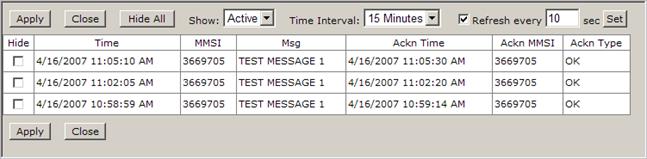
Sent Messages widow description:
Apply: Click this button to save the changes but keep the Sent Messages window open.
Close: Click this button to close the window.
Hide All: Use this button to hide all messages at once.
Show: Use this drop-down box to select All or Active. When you choose All, then you could see all messages even if you already hid them. When you choose Active, then you could see only those messages that were not acknowledged.
Time Interval: Use this drop-down box to select any of predefined intervals of showing of alarms. You could choose from 5 minutes, 15 minutes, 30 minutes, 1 hour, 24 hours, 30 days, 90 days, 365 days or all.
Refresh every: Use this box to type any number of seconds to refresh the Alarm window. When you finish a typing, click the Set button to save you changes.
Hide: Use those checkboxes to acknowledge any of messages. To safe you changes, you have to click Apply.
Apply: Click this button to save the changes but keep the Sent Messages open.
Close: Click this button to close the window.